
Need some Tech support


Turned my pc off normally last night, there were no problems at all. Heard a little "pop" sound some time in the middle of the night and when I went to turn it on this morning, the power button did nothing.
I switched out the power cable and now the box powers on, but there's no output to the monitor. Sounds like it's booting though, but I'm not sure.
This is what I've done so far:
checked everything is clear and undamaged inside the case, it's pretty clean and there's no sign of burnt out parts or anything
tried different power cables
tried different monitor, monitor cables and both VGA slots
tried a much older graphics card (which might not be the best test, since it might be broken)
I am thinking it must be something wrong with either the graphics card or the motherboard now? or something gone on the PSU and it's not supplying enough power maybe.
Kind of out of ideas for what this might be or what I can do to fix this, so if you know anything about hardware I could really use some advice.
I switched out the power cable and now the box powers on, but there's no output to the monitor. Sounds like it's booting though, but I'm not sure.
This is what I've done so far:
checked everything is clear and undamaged inside the case, it's pretty clean and there's no sign of burnt out parts or anything
tried different power cables
tried different monitor, monitor cables and both VGA slots
tried a much older graphics card (which might not be the best test, since it might be broken)
I am thinking it must be something wrong with either the graphics card or the motherboard now? or something gone on the PSU and it's not supplying enough power maybe.
Kind of out of ideas for what this might be or what I can do to fix this, so if you know anything about hardware I could really use some advice.
Posts: 1,976 Joined: Jan 2010
Reputation:
30

I am not sure how I would reset CMOS? remember I get no signal to the monitor at all. no onboard video. I've tried two different monitors+cables and two different graphics cards, going to try another graphics card later today.
Posts: 1,976 Joined: Jan 2010
Reputation:
30

Sounds like your motherboard is going bad and needs replacement. If you cannot receive signal from the monitor from two different types, cables and graphics card. Either way how old is your pc and what type of motherboard socket is it? Examples Intel: LGA 775, LGA 1156 , Z68, LGA 1336? AMD AMD2+, AMD3, AMD3+ (Motherboard that runs AMD3 and the run AMD FX processor that comes out. But don't worry try replacing the CMOS battery. Need step try resetting CMOS for the bios if it works.

If not... then the motherboard probably went bad from a old/leaking capacitor. Check this link out http://en.wikipedia.org/wiki/Capacitor_plague
It doesn't sound like it would be the PSU however I might be wrong because capacitor are also found in PSU if it sounds like it is booting then chances are the PSU might be working
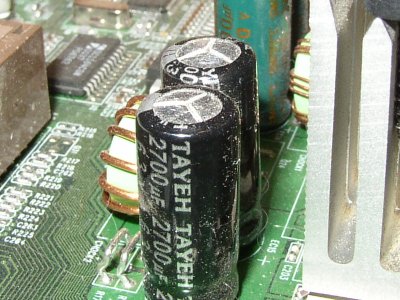
Check your RAM, & Harddrive and don't forget your CPU. Check if the fan is even working or the CPU chip is working. Whats your CPU chip also.
Remember to clean your pc regularly so dust doesn't build up and cause trouble for your graphics fan and cpu fan.
If not... then the motherboard probably went bad from a old/leaking capacitor. Check this link out http://en.wikipedia.org/wiki/Capacitor_plague
It doesn't sound like it would be the PSU however I might be wrong because capacitor are also found in PSU if it sounds like it is booting then chances are the PSU might be working
Check your RAM, & Harddrive and don't forget your CPU. Check if the fan is even working or the CPU chip is working. Whats your CPU chip also.
Remember to clean your pc regularly so dust doesn't build up and cause trouble for your graphics fan and cpu fan.
(This post was last modified: 07-21-2011, 10:42 AM by Adam.)
Posts: 611 Joined: Feb 2010
Reputation:
6
PC is just coming up to two years old in September, the graphics card isn't even a year old. all fans are working (there are about 7 in the **** thing.) including the one on the graphics card. I can't really tell if everything is working because there's no display, but it's making all the right noises heh, HD reading etc. I'll have to dig out the paperwork to look up the exact model. I'll try resetting CMOS, will I lose anything particularly important?
Posts: 1,976 Joined: Jan 2010
Reputation:
30
Resetting CMOS will make any overclocking or custom settings you made in the bios reset to default back to factory state. It will however not affect any files in your hard drives or make any changes to windows. Is it a AMD Computer or Intel Computer?
(This post was last modified: 07-21-2011, 02:49 PM by Adam.)
Posts: 611 Joined: Feb 2010
Reputation:
6
OK resetting CMOS hasn't helped. no signs of damaged capacitors anywhere I can see, but the PSU is housed in a big black box that fills up with dust and I can't see into it. has a nice big "warranty void if removed" sticker on it.
the motherboard is an Asus PQ5 with an intel core 2 quad processor.
also tried another graphics card that I know works for sure. and no luck.
the motherboard is an Asus PQ5 with an intel core 2 quad processor.
also tried another graphics card that I know works for sure. and no luck.
Posts: 1,976 Joined: Jan 2010
Reputation:
30
The 3 possible is PSU as the first now since you said it has filled with dust. The second is the motherboard. The third is possibly the CPU but chances are pretty slim unless you overclocked it more than 1.5+ volts.
The ASUS PQ5 however has a bad rating with motherboard failure
http://www.tomshardware.com/forum/253589-30-asus-loser
The ASUS PQ5 however has a bad rating with motherboard failure
http://www.tomshardware.com/forum/253589-30-asus-loser
Posts: 611 Joined: Feb 2010
Reputation:
6
When a motherboard goes dies it done for. Same as what a hard drive would be. Once it fails it's useless. So if you have a laptop or another pc in the mean time. You should just use that or if you need to use the computer I recommend buying yourself a new motherboard.
http://www.newegg.com/Product/Product.as...6813138314
BIOSTAR G41D3+ LGA 775 Intel G41 Micro ATX Intel Motherboard
$49.99 in USD. 31 British Pounds
It has a very good rating too 5 stars.
or
MSI G41M-P26 LGA 775 Intel G41 Micro ATX Intel Motherboard
http://www.newegg.com/Product/Product.as...6813130556
$50 in USD 32 British Pounds.
Very good rating 5 stars
http://www.newegg.com/Product/Product.as...6813138314
BIOSTAR G41D3+ LGA 775 Intel G41 Micro ATX Intel Motherboard
$49.99 in USD. 31 British Pounds
It has a very good rating too 5 stars.
or
MSI G41M-P26 LGA 775 Intel G41 Micro ATX Intel Motherboard
http://www.newegg.com/Product/Product.as...6813130556
$50 in USD 32 British Pounds.
Very good rating 5 stars
(This post was last modified: 07-21-2011, 05:17 PM by Adam.)
Posts: 611 Joined: Feb 2010
Reputation:
6
Users browsing this thread: